

01What “free” means here
Every tool on this page works without paying, signing in or watching an ad, and nothing adds a watermark to your document. There's no trial that runs out today and no feature held back behind a plan. Inkvolt may sell a Pro version again one day; if it does, this page will say what changed.
02Edit the page itself
Edit Text changes the words already on a page, in the page's own font where the PDF has its letters, and Edit Image replaces or moves a picture. Around that: highlight, underline and strike out text; draw with a finger, Apple Pencil or a stylus; add text, notes, shapes, images, links and stamps. Every mark is a standard PDF annotation, so other PDF apps show it.
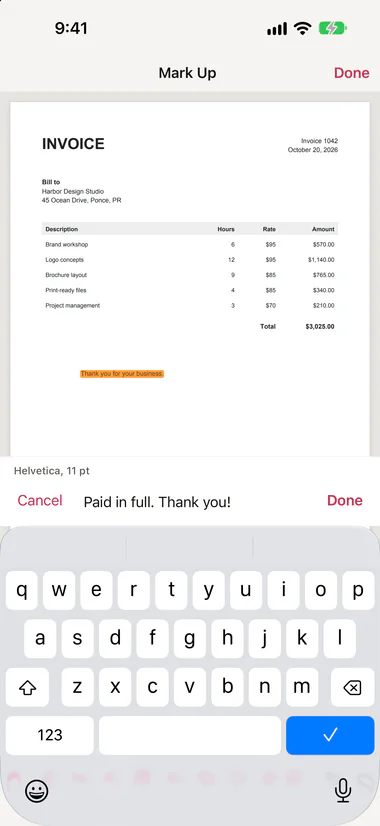
Edit Text, on the page
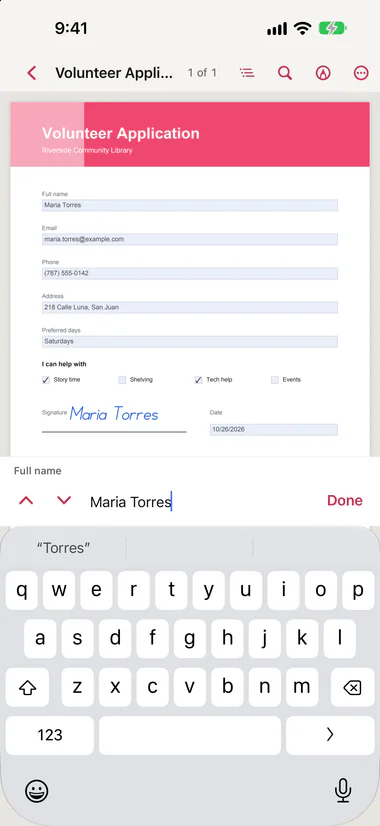
A form, field by field
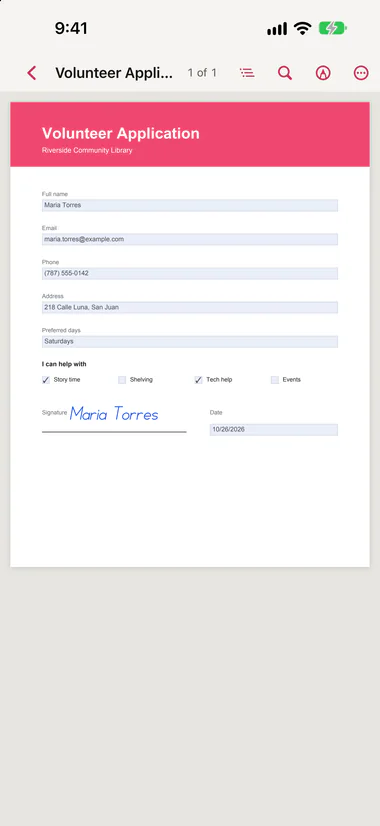
Filled in and signed
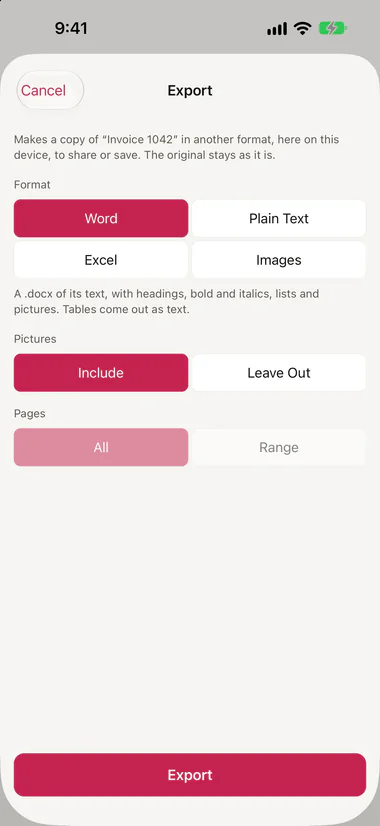
Export to Word or Excel, on the phone
03Fill and sign
Fill in a PDF's form fields one after another, or let AutoFill fill a form from a profile kept on your device (name, address, phone, email, dates). Sign and initial with a signature you draw once. When a form needs a signature that can be verified, sign with a certificate, with an optional trusted time, and check the signatures a document already has.
04Convert and organize
Export a PDF to Word, Excel, text or images, on the device: the document isn't sent to a conversion server. On iPhone and iPad, Word, Excel, PowerPoint and iWork files, web pages and text become PDFs; on Android, web pages and text do. Merge documents, split one, compress it, and rotate, reorder, insert or crop pages.
05Protect
Redact removes what you black out from the document for good, rather than drawing a box over it. Remove Hidden Data, Flatten, protect a copy with a password (AES-256), add watermarks, headers and footers, Bates numbers, or save a PDF/A copy for archiving. App Lock keeps the whole app behind Face ID, Touch ID, your fingerprint or the screen lock.
06What others charge
The PDF editors people search for most, as their App Store pages showed them: in-app purchases listed on 9 November 2026, privacy label headings checked on 11 November 2026 (US store). Prices change; the store page is the authority.
| App | In-app purchases listed | App Store privacy label |
|---|---|---|
| Inkvolt | None today; every tool free for now | Data Not Linked to You (diagnostics, identifiers) |
| Adobe Acrobat Reader | $6.99–$69.99 | Data Used to Track You; Data Linked to You |
| PDF Expert | $9.99–$79.99 | Data Linked to You; Data Not Linked to You |
| iLovePDF | $5.49 a month, $44.99 a year | Data Linked to You; Data Not Linked to You |
| Xodo | $11.99 a month, $107.99 a year | Data Used to Track You; Data Not Linked to You |
| PDFgear | None on iPhone (sold on Android) | Data Not Linked to You |
To be fair to them: Acrobat, PDF Expert and the others are mature apps with features Inkvolt doesn't have, such as sending documents out for signature and syncing through an account, and PDFgear is free on iPhone too. Inkvolt's case is narrower: the editing tools, on the device, with no account and nothing linked to you.
07Questions
Is it really free?
Every tool in Inkvolt is free for now, with no account and no ads. No trial, no watermark and no subscription. If Inkvolt ever sells a Pro version, its store pages and this page will say so.
Do I need an account?
No. There is no sign-in of any kind; your documents live in a folder on your device (on iPhone and iPad, the Inkvolt folder in the Files app).
Can it edit the text of a PDF, not just add comments?
Yes. Edit Text changes the words already on the page, in the page’s own font where the PDF carries its letters.
Does converting to Word upload my file?
No. Export to Word, Excel, text and images runs on the device.
Is there a Mac or Windows version?
Yes, as separate apps: Inkvolt PDF for Windows and Mac, free and open source.
Apple, the Apple logo, iPhone, iPad and Apple Intelligence are trademarks of Apple Inc., registered in the U.S. and other countries; App Store is a service mark of Apple Inc. Google Play, the Google Play logo, Android and Gemini are trademarks of Google LLC. Other app names are their owners’ trademarks. Inkvolt is independent and not affiliated with any of them. The screenshots show invented sample documents.