

01What happens to a scan
The camera finds the page's edges and straightens it into a clean, cropped PDF, with Color, Grayscale, Black & White and Photo filters. On iPhone and iPad that's Apple's document camera; on Android it's Google's document scanner, which runs inside Google Play services on the phone. Either way the pages go into Inkvolt and stay on the device. Book mode turns a photo of an open book into two pages, both sides of an ID card go on one page, and a stack is split at its blank pages.
02Text, read on the device
Make Searchable reads a scan and adds its text, so you can search it, select it and copy it. iPhone and iPad read print and handwriting with Apple's Vision. Android reads print with Google's text recognition; on Android phones with Gemini Nano, handwriting is read by it too, on the phone. No picture of a page and none of its text leaves the device.
03Named and filed for you
A new scan is named from what it says (“2026-10-28 Invoice – Northwind Printing Co.”) instead of “Scan 14”, and Inkvolt suggests the folder it belongs in, learning where you file scans like it. Settings › Scanning › File new scans chooses Ask, Automatically or Off. What it learns stays on your device.
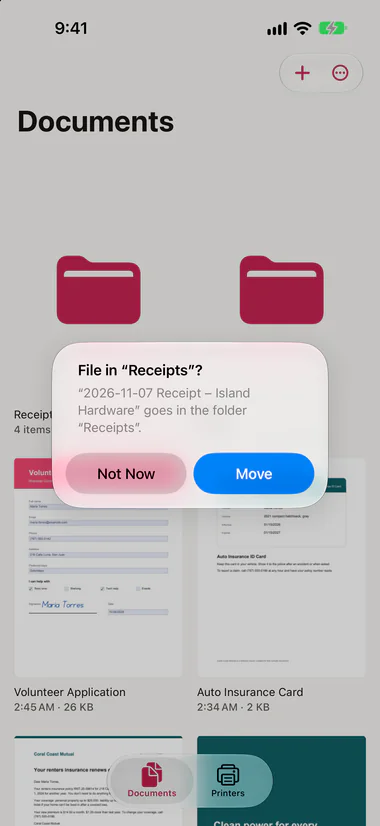
A scan named from its text, offered a folder
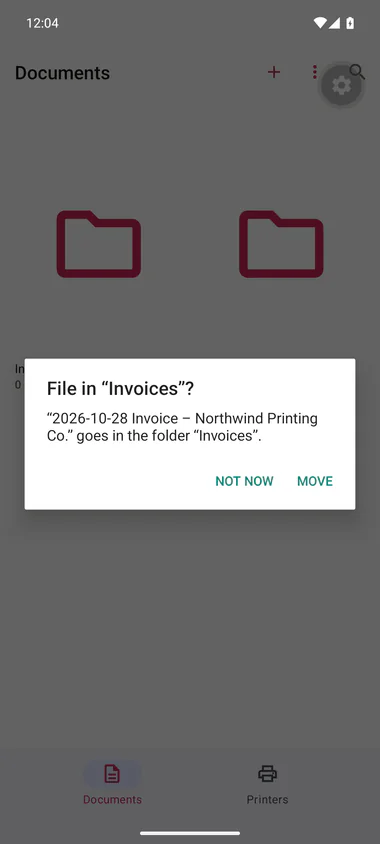
The same on Android
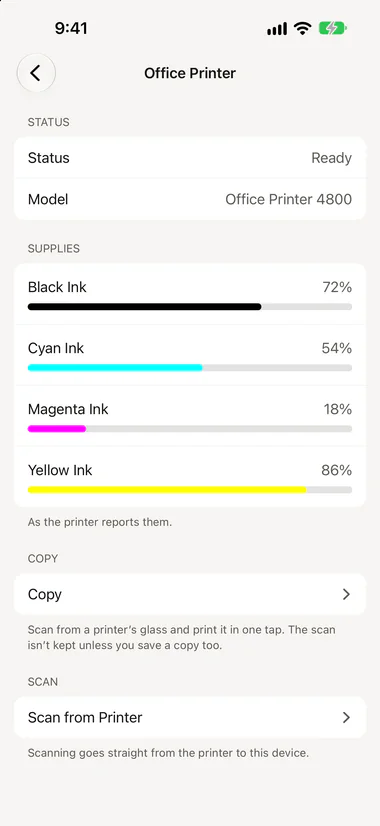
Your printer: scan from it, see its ink
04From your printer, too
If your printer scans, Inkvolt scans from its glass or document feeder over your Wi-Fi, in color or gray, at 150, 300 or 600 dpi, from any brand that works with AirPrint or Mopria, with no printer-maker account. It also shows the printer's ink or toner, and Copy scans and prints in one tap.
05Compared with other scanners
If you're leaving a scanner app because of a subscription or because your documents went to someone's cloud, here is what the three most-rated scanners on the US App Store list, as their pages showed them: in-app purchases on 9 November 2026, privacy label headings checked again on 11 November 2026. The labels are the developers' own statements to Apple.
| App | In-app purchases listed | App Store privacy label |
|---|---|---|
| Inkvolt | None today; every tool free for now | Data Not Linked to You (diagnostics, identifiers) |
| CamScanner | $0.99–$69.99, including a $9.99 weekly plan | Data Used to Track You; Data Not Linked to You |
| Adobe Scan | $3.99–$69.99 | Data Used to Track You; Data Linked to You |
| Genius Scan | Plus $1.99–$11.99 once; Ultra $39.99–$49.99 a year | Data Linked to You; Data Not Linked to You |
All three are capable, popular scanners, rated 4.8 or 4.9 by well over a million people each on that day, and Genius Scan says it processes documents on the device. What they offer that Inkvolt doesn't: cloud sync and accounts, and fax in CamScanner. What Inkvolt offers instead: no account, nothing linked to you, scans from your own printer, and a full PDF editor in the same app. On Google Play on 9 November, CamScanner showed ads and its Data safety section said it shares data with third parties; Inkvolt shows no ads and shares no data.
Sources: each app's App Store page (apps.apple.com, US) and its Google Play page and Data safety section, read on 9 November 2026 (labels again on 11 November).
06Moving your scans
Share or save your scans from the old app as PDFs (to Files on iPhone, or a folder on Android), then open them in Inkvolt or add the folder as a cloud folder. A PDF that already has text is found by Inkvolt's search right away; one without text becomes searchable with Make Searchable.
07Questions
Is the scanner free?
Every tool in Inkvolt is free for now, with no account and no ads. Camera scans, printer scans and Make Searchable have no limit.
Are my scans uploaded anywhere?
No. Inkvolt has no server for your documents. On Android, the camera scanner and text recognition are Google’s, running in Google Play services on the phone; Google may collect diagnostics about how they performed, never your pages.
Does it read handwriting?
On iPhone and iPad, yes, with Apple’s Vision. On Android, print is read by Google’s text recognition, and handwriting on phones that have Gemini Nano.
Can I lock the app?
Yes. App Lock uses Face ID, Touch ID, your fingerprint, face or screen lock.
Can it fax or sync between devices?
No. Fax is a paid service and sync needs an account, and Inkvolt has neither. To use a document on another device, keep it in a cloud folder you pick, such as iCloud Drive, Google Drive, OneDrive or Dropbox.
Apple, the Apple logo, iPhone, iPad and Apple Intelligence are trademarks of Apple Inc., registered in the U.S. and other countries; App Store is a service mark of Apple Inc. Google Play, the Google Play logo, Android and Gemini are trademarks of Google LLC. Other app names are their owners’ trademarks. Inkvolt is independent and not affiliated with any of them. The screenshots show invented sample documents.