

01What you get
One .xlsx workbook with a row a document: Date, Vendor, Total, Tax, Currency and a link that opens the receipt itself. Dates are real dates and amounts are numbers, so a sum, a filter or a pivot table works the moment you open it in Excel, Numbers, Google Sheets or LibreOffice.

02Step by step
- Scan the receipts with the camera, bring them in from Photos, or scan a stack from your printer's document feeder. A new scan is named from its own text (“2026-11-07 Receipt – Island Hardware”) and Inkvolt offers to file it in your receipts folder; it learns where you put scans like it.
- Choose Export to Spreadsheet… Long-press the folder, or pick it from Tools in the library or in a document, or select the documents you want.
- Check the review. Each receipt is a card with its fields, and every field can be edited. A field Inkvolt wasn't sure of is marked Check; editing it clears the mark.
- Save or share. On iPhone and iPad the workbook is saved beside your documents, where the Files app shows it; on Android, Save to… puts it in a folder you pick. Share sends it anywhere.
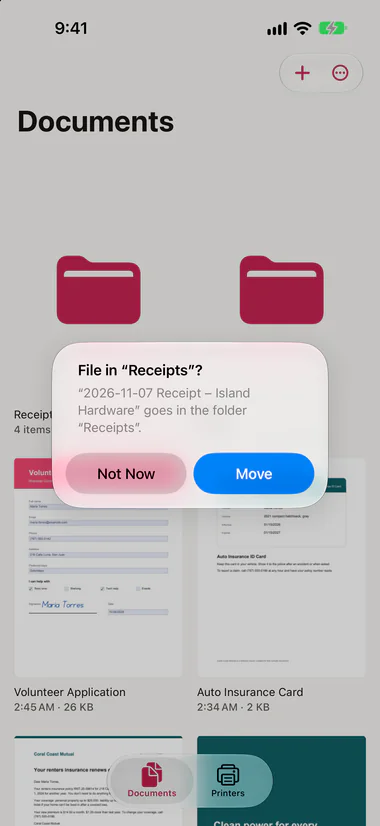
A new scan, named from its text, offered a folder
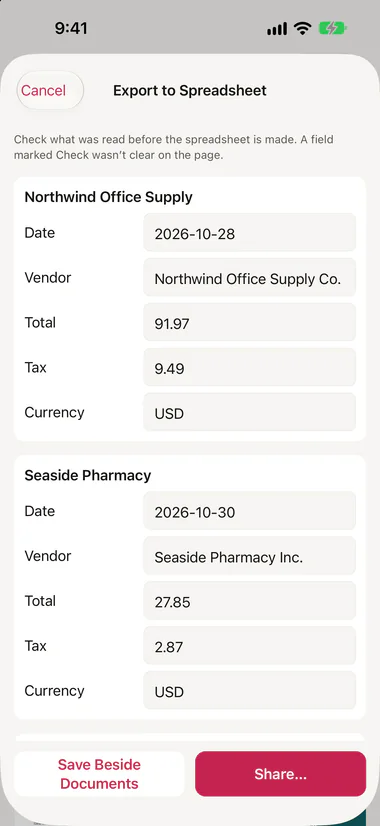
The review on iPhone: every field editable
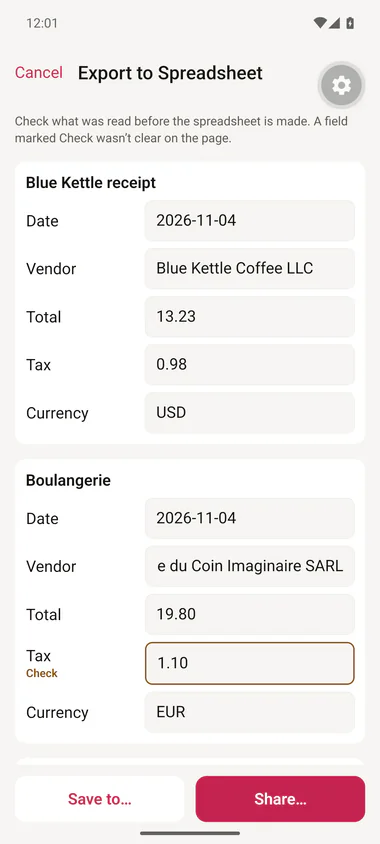
On Android, a field to check
03What it reads
- The total from the line that says so (“Total”, “Total TTC”, “Gesamtbetrag”, “Valor total”), not the subtotal.
- The tax by its name: sales tax, IVA, Puerto Rico's IVU, Mexico's IEPS, MwSt., TVA, Canada's TPS, TVQ and TVH. Several rates on one receipt are added together.
- Amounts written six languages' ways: $1,234.56, 1.234,56 €, R$ 1.234,56, CHF 1'234.50. A “$” with no country is your own currency.
- The date and the vendor the same way Inkvolt names a scan, from the receipt's first lines.
It reads a document's first three pages and its last one, where receipts and invoices put these things. It doesn't sort expenses into categories: add a column for that in the sheet.
04What it needs
Text. An invoice that came as a PDF has it. A scan has it once it's searchable: Make Searchable (in Tools, or More in a document) reads the page on the device and adds the text. If a document has none, the review says so instead of guessing. A faded or crumpled receipt reads less well, which is what the Check marks are for.
05Where your receipts go
Nowhere you didn't send them. The scan, the reading and the spreadsheet all happen on your phone; Inkvolt has no server to send receipts to and no account to make. What Inkvolt learns about your folders stays on the device too. The privacy policy lists the only two things the app sends on its own: an error report when something breaks, with nothing from your documents in it, and a check for updates, which you can turn off.
06Questions
Is it free?
Yes, today. Every tool in Inkvolt is free for now, with no account and no ads. There is nothing to subscribe to.
Does it work offline?
Yes. Scanning, reading and making the spreadsheet need no connection.
Which spreadsheet apps open the file?
It is a standard .xlsx workbook: Excel, Numbers, Google Sheets and LibreOffice open it.
Can it read receipts in Spanish, French or German?
Yes. It reads totals, taxes, dates and amounts in English, Spanish, Portuguese, French, German and Italian, and the app itself is in those six languages.
Does it categorize expenses or track mileage?
No. It reads the date, vendor, total, tax and currency of each document and links to it. Categories, budgets and mileage are for a spreadsheet or an accounting app.
Apple, the Apple logo, iPhone, iPad and Apple Intelligence are trademarks of Apple Inc., registered in the U.S. and other countries; App Store is a service mark of Apple Inc. Google Play, the Google Play logo, Android and Gemini are trademarks of Google LLC. Other app names are their owners’ trademarks. Inkvolt is independent and not affiliated with any of them. The screenshots show invented sample documents.