

01Search every document
The library's search field looks inside your documents, not only at their names. Each result shows the document, its best pages and the lines around your words, marked; tap one and the document opens at that page with the words highlighted. Capitals and accents don't matter (“resume” finds “résumé”), a phrase is found as a phrase, and the start of a word is enough.
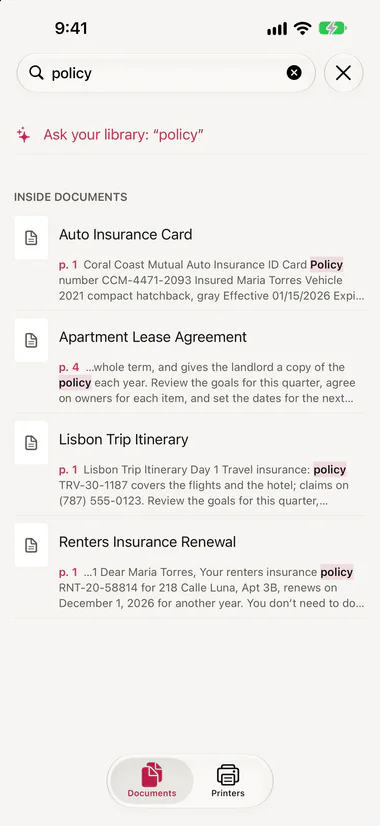
One word, found in four documents
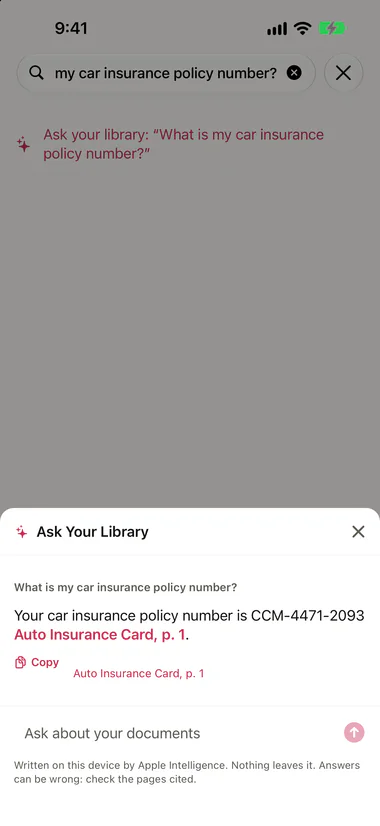
Ask Your Library: the answer and its page
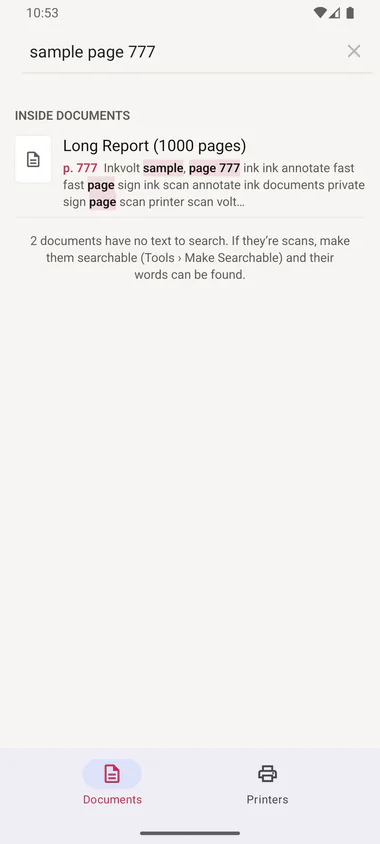
Page 777 of 1,000, on Android
02Scans too
A scan is a picture until its text is read. Make Searchable reads it on the device (Apple's Vision on iPhone and iPad, handwriting included; Google's text recognition on Android, and Gemini Nano for handwriting on phones that have it) and from then on its words are found like any other. If some documents have no text yet, the results say how many and how to fix it.
03Ask your library
Above the results, Ask your library turns your search into a question over all your documents: “What is my car insurance policy number?” Inkvolt finds the passages most likely to hold the answer and the AI on your device writes the answer from them, citing each document and page; tap a citation to open it there.
- On iPhone and iPad it uses Apple Intelligence, where available.
- On Android it uses Gemini Nano, on phones that have it.
- On a device without either, Ask Your Library doesn't appear, unless you connect an AI server of your own (off unless you turn it on; the passages and the documents' names then go to that server, and nowhere else).
An AI answer can be wrong, which is why every answer names its pages: check them before you rely on one.
04How it works
Inkvolt reads each document's text into a search index kept on your device, a page at a time in the background while the app is open, and keeps it out of your iPhone's backups. Nothing in it is ever sent anywhere. Search matches whole words, phrases and word starts; to answer a question, the pages are ranked with BM25, a long-standing search formula, and the best passages go to the on-device model. Documents in cloud folders are found by their names only. Settings › Search shows how much has been read and rebuilds the index.
05Questions
Is it free?
Yes, today. Every tool in Inkvolt is free for now, with no account and no ads. Search and Ask Your Library have no limit.
Do my documents go to an AI company?
No. Ask Your Library uses the model on your device (Apple Intelligence or Gemini Nano). Only if you set up an AI server of your own do the passages it needs go to that server.
Which phones can ask questions?
iPhones and iPads with Apple Intelligence, and Android phones with Gemini Nano. Search inside documents works on every phone Inkvolt runs on.
Does it search documents in iCloud Drive, Google Drive or Dropbox?
By their names. Their contents aren’t read for the index; documents in Inkvolt’s own library are.
Can it find text in a photo or a scan?
Once the scan is searchable. Make Searchable reads it on the device, handwriting too where the device can.
Apple, the Apple logo, iPhone, iPad and Apple Intelligence are trademarks of Apple Inc., registered in the U.S. and other countries; App Store is a service mark of Apple Inc. Google Play, the Google Play logo, Android and Gemini are trademarks of Google LLC. Other app names are their owners’ trademarks. Inkvolt is independent and not affiliated with any of them. The screenshots show invented sample documents.